Posts

Testing MySQL Router Deployments on Kubernetes with InnoDB ClusterSet

Testing MySQL Router Deployments on Kubernetes with InnoDB ClusterSet Testing MySQL Router Deployments on Kubernetes Once your MySQL Router is deployed and configured to handle read/write routing between InnoDB ClusterSet primary and secondary clusters, the next critical step is verifying that the routing behaves as expected. In this post, we’ll walk through a simple Kubernetes-native testing strategy using a minimal Python application to validate Router behavior across ports 6446 (RW) and 6447 (RO). The Goal We want to: Write to MySQL via Router port 6446 every 2 seconds. Read via Router port 6447 every 2 seconds. Log RW operation metadata to a dedicated table ( rw_log ). Print RO query responses in the pod logs. This lets us monitor which router handled the request and from which pod, helping validate traffic direction and router/cluster availability in a live environment. ...

Server Load on Linux Systems and Its Relationship to Database Performance

 What Is Server Load? Server load is basically a measure of the amount of computational work a system is performing. In Linux, the system load primarily reflects the demand for the CPU’s resources over time. This measurement includes both the processes currently being executed by the CPU and those waiting for CPU access. The output of server load is typically represented as three numbers, which gives the average load over the last 1, 5, and 15 minutes. 1 minute load average : Immediate snapshot of the CPU demand. 5 minute load average : Mid term trend in resource usage. 15 minute load average : Long term overview of system load Higher numbers indicate higher CPU demand but related to the number of CPU cores of the server. For example, a load of 4 on a system with 4 cores means the system is running at capacity. On the other hand, a load of 8 on the same system indicates that processes are waiting for CPU time, which could signal a performance bottleneck. Run Queue and Block Queue...

MySQL Audit triggers

Image
Introduction How do you enable auditing in MySQL? There are multiple options including plugins, external tools, custom scripts etc. Among these using triggers is a popular and straight forward method when the audit scope is well defined. Specially when it is required set of application tables for DML this is a suitable option. Generating audit triggers can be tedious task as it will be repetitive task to create the triggers. Also, over time it would be difficult to track what tables are being audited for which options. Also using ad hoc audit triggers results in ad hoc audit meta data. Solution What if we can use built in MySQL procedure to have standard way to enable DML audit for given set of tables and track what tables being audited for which audit options. https://github.com/stefanhubb4/MySQLAudit_triggers.git This repo provide MySQL procedures that will help in creating DML (update, insert, delete) audit triggers quickly while managing metadata on audited tables. A...

Production ready AWS MySQL RDS instance using terraform

Using Terraform for AWS RDS implementation is not new. It is a well defined process with required resources already defined by Hashicorp and AWS. But one pitfall associated with IAC as a whole is the possibility that some of the production implementation considerations that might have been covered when provisioning manually might not be highlighted when the infrastructure is initiated using terraform. Idea of this post is to list down such points and provide sample terraform script for production ready AWS Mysql rds.  1. Configure backups, maintenance windows, version upgrade preference. Make sure to include variables "rds_backupWindow" , variable "rds_maintenanceWindow", variable "rds_backupRetentionPeriod". Ensure time windows are set as per the timezone setting of AWS data center in use. Refer 02-rds-variables.tf.   2. Use separate file for parameter management. This should include all rds parameters such as db instance name, size and also the databa...

MySQL router kubernetes deployment

How to setup MySQL router in Kubernetes cluster? Continuing from previous post - MySQL router high availability for InnoDB cluster , in situations where application is deployed in kubernets it is better to incorporate mysql router to K8s itself. Inorder to deploy Mysql router in kubernetes two services are required along with the mysql router deployment. MySQL Router deployment Router deployment should listen on two ports for read write and read only connections. hostAliases are used to define the backend innodb cluster database servers. MySQL router docker image is used with variables - MYSQL_HOST, MYSQL_PORT, MYSQL_USER and MYSQL_PASSWORD. MYSQL_HOST variables should point to MySQL service defined in next section. mysql_router_deployment.yaml apiVersion: apps/v1 kind: Deployment metadata: name: mysql-router namespace: default spec: replicas: 1 selector: matchLabels: app: mysql-router template: metadata: labels: app: mysql-router ...

MySQL router high availability for InnoDB cluster

Image
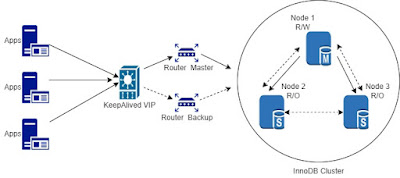
How to setup MySQL router with High availability for InnoDB cluster? MySQL router deployed as part of an Innodb cluster must be able to withstand any failures as it acts as the middle man between application and database cluster. There are two options when installing the routers, Install the MySQL routers on application servers, so the routers are a part of application availability it self. MySQL recommends this as the default installation method in the router FAQ section as well. Ref -  https://dev.mysql.com/doc/mysql-router/8.0/en/mysql-router-faq.html#faq-mysql-router-how-install Install MySQL routers on separate servers. Option two can be used based on the specific design consideration of a given deployment. As an example there are some deployments where router servers are deployed in separate network segment from databases clusters and application servers. When routers are deployed separately it is a must that they are highly available. No matter running a multi node Inn...

Jenkins MySQL - auto apply database changes from SCM

A database change apply step for Jenkins pipeline? When designing for the fully automated deployment pipeline, databases tend to become the bottleneck more often than not. Starting with the complications of storing database changes in the SCM to applying the actual changes with availability and rollback in consideration can be challenging. Given the uniqueness of each deployment coming up with a single solution for this type of requirement is practically impossible. Having this mind, we will try to come up with a simple set of process and a supporting bash script that can help to automate the database change apply process. This particular solution was mainly proposed as an automation step for development environment where multiple dev teams are changing the same databases backend. This requires some discipline from the developers while committing the code to the SCM as well. The particular implementations is based on Jenkins MySQL and GitLab as SCM. The Idea In a step wise timel...

MySQL InnoDB Cluster in 15 minutes

Image
What is MySQL innodb cluster MySQL innodb cluster is a high availability solutions provided by MySQL which includes both database service auto failover and Client auto failover. It utilize multiple technologies underneath to ensure its availability targets. Group Replication -- Ensure distributed consensus, Make sure all member of the cluster agrees same state transaction wise. MySQL Shell -- Provide cluster maintenance and monitoring interfaces. MySQL Router -- Manges client failovers, provide a single access point for clients. Setting up innodb cluster Although a complete solution, quickly setting up cluster at least for testing purposes can be challenging using the normal process. This is mainly because it involves different technologies and the requirement of setting up at least 3 nodes. Hence we can use below Vagrant and Virtual box based solution to setup MySQL innodb cluster rapidly also with the reusability. InnoDB cluster using Vagrant and Virtual box Inst...

MySQL check query execution time, number of executions - Using general log

Image
How to get MySQL Query Time using general log data Quickly finding the query execution time can be very helpful during scenarios such as load tests. Below are simple set of steps to extract the query time , number of execution based on general log. Set general_log and log_output parameters, this should log all queries to mysql.general_log table SET global general_log = 1; SET global log_output = 'table'; Create a table with id column included to general log table CREATE TABLE `test.general_log_id` ( id MEDIUMINT NOT NULL AUTO_INCREMENT, `event_time` timestamp(6) NOT NULL DEFAULT CURRENT_TIMESTAMP(6) ON UPDATE CURRENT_TIMESTAMP(6), `user_host` mediumtext NOT NULL, `thread_id` bigint(21) unsigned NOT NULL, `server_id` int(10) unsigned NOT NULL, `command_type` varchar(64) NOT NULL, `argument` mediumblob NOT NULL, PRIMARY KEY (id) ) ENGINE=innodb DEFAULT CHARSET=utf8 COMMENT='General log'; Filter out the data from mysql.general_log and insert t...

MySQL int max value

Image
What is MySQL int max value? MySQL int max value is 2147483647 when signed and of 4294967295 when unsigned. Although rare, there are situations where auto increment columns does reach MySQL int 11 max value specially when signed. Comparison of MySQL int data types and there max values MySQL provide five int data types, TINYINT - 1 byte - max 127 signed and 255 unsigned  SMALLINT  - 2 bytes - max 32767 signed and 65535 unsigned  MEDIUMINT - 3 bytes - max 8388607 signed and 16777215 unsigned  INT (11) - 4 bytes - max 2147483647 signed and 4294967295 unsigned BIGINT - 8 bytes - max 2 63 - 1 and 2 64 - 1 unsigned First three int types can be used when the highest value is predictable, else it is always safe to go for MySQL int 11 or bigint. Bigint does provide huge limit advantage over int 11 , compromising the fixed storage space usage of  2 times (8 bytes compared to 4 bytes) which can cause access overheads as well. Script to identify...

Solaris Linux iostat in DBAs view

Image
Background When troubleshooting  any database performance issue, we need to understand that it can happen in two possible sequence, 1. Additional large utilization (load) on database server causing the delay in normal database operation. Which can be from newly added application component, query that is running abnormally (e.g plan change),  new parallel execution etc.. 2. A change or suboptimal operation on underlying hardware/software layer that causes the default load of the database to take more time than it usually does. Here database system is not the culprit but the victim. It is trying its best to perform as it used to, but a bottleneck in different layer that is not in the control of database is causing the delay. Example Below is a demonstration using iostat command in Solaris environment running Oracle database, which shows the metric differences while database system is experiencing performance delays. In both situation the result is the same, distorted db pe...

ORA-16433: The database or pluggable database must be opened in read/write

Image
ORA-16433 is an error returned when a database cannot be opened. This can be a result of multiple conditions including, The inconsistency of the database Physical corruption Loss of dependent files or access issues etc.. More often than not the solution is to recover from available backups, but there can be situations where backups are not available, specially on UAT or Test setups. Although not the ideal scenario, in this type of situation you might want to open the databases even with inconsistency.  In Comes --> _ALLOW_RESETLOGS_CORRUPTION First, if you are in a position to use _ALLOW_RESETLOGS_CORRUPTION=TRUE, that means it has to be a critical moment, and when you come across more ora- errors while you are trying to reopen the databsae, that can be annoying. Note - _ALLOW_RESETLOGS_CORRUPTION=TRUE must only be used after Oracle support confirmation as a last resort. Also make sure to take cold backup before proceeding. Basic steps to be followed to resolve ORA 16433 af...
